


The Knot Wedding Planner
4.716.12K Reviews
App Specs
- Version
- 5.0.3
- Updated On
- License
- Free
- Downloads
- 1,000,000+
- Developer
- The Knot
- Categories
- Events
- Platform
- Android, iOS
Screenshots

 Analysis by AppCompare
Planning a wedding rarely happens in one neat block of time. I find it’s more often a series of small decisions squeezed between errands, messages and conversations with family. The Knot Wedding Planner is built for that on-the-go rhythm, bringing planning tools into one mobile app. Its main appeal is not that it can make every choice for you; it’s that it gives you a place to keep the next steps visible while the details are still changing.
When a connection changes the planning flow
Some parts of wedding planning naturally involve looking outward: comparing vendors, checking details with a partner, and sharing information with guests. Those moments are where a dependable internet connection matters most. I’d use the app when I’m ready to research or update something, rather than assume every page or shared detail will be available in every setting.
That distinction is useful in real life. If I’m on the way to meet a vendor, I would open the information I need before leaving home, while I have a steady connection. I wouldn’t want to rely on searching or loading a page at the venue entrance, where reception may be poor. The practical habit is simple: prepare for an important conversation before the commute, then use the app to keep the planning thread organized afterward.
Small mobile sessions, not a planning marathon
The app makes the most sense to me as a companion for short sessions. I can check what needs attention, add a note or move one task forward, then put my phone away. That is less overwhelming than trying to settle the whole wedding in a single sitting, and it suits the stop-and-start nature of coordinating with several people.
A realistic example: I’m waiting for an appointment and remember that I need to compare a couple of vendor options. I can use that time to review what I’ve already collected, note a question for my partner, and decide on the next follow-up. I would still make the final call after discussing the trade-offs together; having planning information on a phone is convenient, but it doesn’t replace a conversation about priorities or budget.
What to do when something doesn’t load
Mobile services can feel less dependable when a connection drops or a page takes too long to appear. I’d avoid making a time-sensitive decision based on a screen that hasn’t fully loaded. Instead, I would pause, try again when the connection is stronger, and keep any crucial vendor contact details or appointment notes somewhere I can reach without depending on that moment’s connection.
This is also a good reason to treat the app as a planning hub, not the only copy of every important detail. For a meeting, I’d confirm the time and address in advance and keep the key information in a form I can readily refer to. If an update is important to a guest, I’d check that it has gone through before assuming everyone has seen it. These are ordinary precautions, but they prevent a minor connectivity snag from becoming a wedding-day problem.
Worth Reading Before You Choose

Flipboard Shows What News Apps Must Do Beyond the Feed

Switching to Android Auto Means Rethinking Your Driving Routine

Google Calendar Makes a Crowded Week Easier to Manage

Ludo King Makes the Most of the Minutes Between Plans

Baby Panda World Brings Quick Play to Modern Phones, but Its Game Library Feels Busy

ESPN’s Live Game View Makes Following Close Games Easier
Using it thoughtfully on mobile data
If I’m trying to be careful with mobile data, I’d save browsing-heavy tasks for Wi-Fi and use brief check-ins while out. Vendor research and revisiting shared pages can involve more loading than simply reviewing a short task list, so separating those activities is a sensible routine. I also wouldn’t leave a long research session open while moving between weak-signal areas; it is easier to focus when I can compare options deliberately.
There’s a human side to this, too. Wedding planning often involves other people’s time and opinions, and a quick update can prompt a whole chain of replies. I’d use quiet moments to gather questions, then discuss them together rather than trying to resolve a complicated choice through rushed messages. The app can help keep the work in view, but good coordination still depends on clear conversations.
Getting Started with The Knot Wedding Planner
Diving into The Knot Wedding Planner is like stepping into a world where everything is organized for you. From the get-go, the app prompts you to input your wedding date and location, and voilà, your personalized dashboard is ready to assist. It’s like having a digital assistant that never takes a break!
The interface is super intuitive. You can tell a lot of thought has gone into making it user-friendly. The homepage displays a countdown to your big day, which is both thrilling and a little nerve-wracking. But don’t worry, because the app’s got your back, guiding you through every step with its checklist feature.
Features That Stand Out
One of the standout features is the checklist. It's a lifesaver. The tasks are broken down into manageable chunks, making even the most daunting tasks seem doable. Plus, it’s customizable, so you can add or remove tasks as you go. Trust me, this feature alone can save you from potential planning meltdowns.
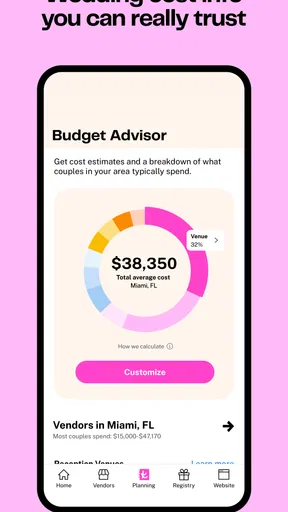
Another gem is the budget tool. Weddings can be expensive, and staying on top of your spending is crucial. This tool helps you track your expenses and keeps you within budget. You can even sync it with your bank accounts for real-time updates. It's like having a financial advisor in your pocket.
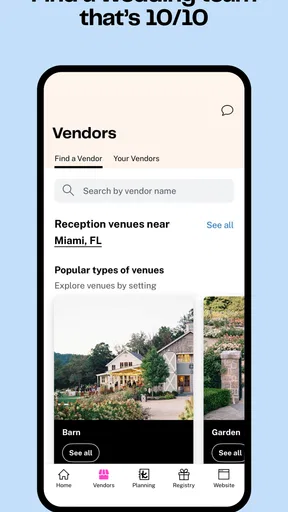
And let’s not forget the vendor section. Finding the right vendors can be a hassle, but The Knot’s vendor list is extensive and reliable. You can filter by category, location, and even read reviews from other couples. It’s like having a little black book of the best in the biz.
Personal Touches
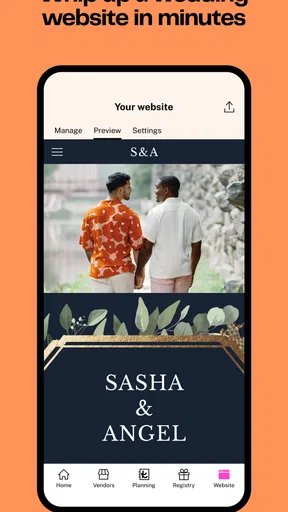
What makes this app even more special are the personal touches. The Knot lets you create a wedding website, which is a fun way to keep your guests in the loop. You can share your love story, upload photos, and even manage RSVPs. It’s a beautiful way to keep things personal and organized.
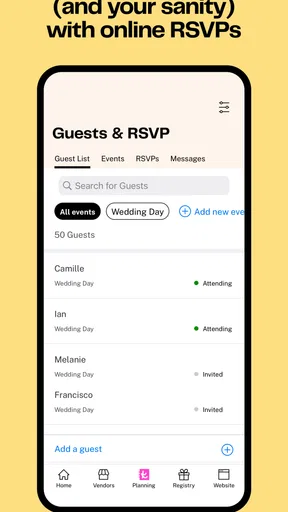
The guest list manager is another feature I found incredibly helpful. Keeping track of invites, RSVPs, and meal preferences can be a headache, but not with this app. Everything is in one place, and you can even link it to your wedding website for seamless updates.
Making the tools work together
I get the most value by treating the checklist as the starting point, not the whole plan. When a task involves choosing a vendor, I can use it as a prompt to compare options, then record the next action I need to take. For example, instead of leaving “choose a photographer” as one large, vague item, I’d turn it into manageable steps: decide what style matters, shortlist candidates, ask about availability, and agree on a budget before booking. That keeps the list useful without letting it dictate what matters most to us.
The budget tool is most helpful when I update it close to the moment a decision is made. If I wait until several purchases have happened, it becomes harder to remember what was a deposit, what remains due, and which figure is only an estimate. I’d keep a brief note alongside each amount about its status and who is handling the next conversation. A planning app can make totals visible, but it cannot decide whether a higher quote is worth it for your priorities.
For couples who share the work, I’d agree on a simple division before adding lots of activity: who contacts vendors, who tracks guest replies, and who has the final say on a change. That prevents two people from assuming the other has handled the same task. It also makes the app more useful as a shared reference point rather than another place where everyone expects someone else to check.
Where it fits among wedding-planning options
Compared with a paper planner, this app is easier to carry and update while you’re out, and its vendor research and guest-facing website sit alongside the planning tools. A spreadsheet can be better for couples who want custom formulas, highly specific columns, or a layout tailored to an unusual budget. A shared calendar is stronger for coordinating appointments and deadlines, while a notes app can be simpler for collecting ideas without setting up a wedding workflow.
I wouldn’t force every detail into one system. The Knot is a good fit if you want a wedding-focused home base and appreciate prompts that help turn a big project into smaller actions. If you already have a detailed spreadsheet that both partners maintain consistently, moving everything may create extra work rather than reduce it. You can use the app for the parts that benefit from its vendor, checklist, budget and guest tools while keeping specialized records in the format that suits you.
Who will appreciate it, and who may not
I’d recommend it to someone planning a wedding who wants a structured starting point, especially if the to-do list, vendor search and guest communication feel scattered across messages and scraps of paper. It can also help a couple who are planning in short bursts around work and family commitments, because the next task is easier to pick up when it has already been written down.
It may be less appealing if you prefer to keep wedding details private and offline, or if you want complete control over every planning field and report. It is also not a substitute for a professional planner when you need hands-on coordination across many suppliers or help handling difficult logistics. I’d think of it as an organizer for the couple, not as someone who negotiates, confirms arrangements or makes judgment calls on your behalf.
Choosing the right level of organization
One small but useful habit is to review the checklist together once a week, rather than reacting to every item as soon as it appears. We could mark what is genuinely time-sensitive, what depends on another person, and what can wait. That stops a long list from making every task feel equally urgent. It also gives the couple a regular moment to notice when plans have changed and remove or adjust steps that no longer apply.
For the guest list, I’d settle on one consistent way to enter names and responses before several relatives start helping. Agreeing on spelling, household groupings and how to handle plus-ones avoids cleanup later. If meal preferences matter, capturing them as replies come in is less stressful than trying to reconstruct them from separate conversations near the deadline. The app can keep those details together, but the accuracy still depends on careful, consistent updates.
For vendor comparisons, I’d write down the same questions for each candidate before reaching out. Availability, what is included, payment timing and cancellation terms are useful points to clarify, though the specific questions will depend on the service. This makes comparisons fairer than relying on a polished profile or a single review. The app can help you discover and organize options; I’d still verify the details directly with the vendor before committing.
Cost, access and everyday expectations
The app is free, and it is designed for a broad audience, with an Everyone age rating. The Knot is the developer, and the app has a 4.8 average from around 57,000 ratings, with more than a million installs. Those figures suggest that many couples have found a reason to try it, but I’d choose it based on whether its particular mix of planning tools suits the way you work, not on popularity alone.
It is an events app rather than a general-purpose project manager, so its value comes from wedding-specific tasks and guest planning. That focus is helpful when you want a prompt for a familiar wedding decision; it can feel restrictive if your event is unconventional or you need to manage complex work outside the usual planning flow. I’d adapt the checklist to your actual celebration instead of treating every suggested task as mandatory.
The current version is 4.36.0, and the app supports devices running iOS 9 or later. Before making it the place where you keep everything, I’d check that it works comfortably on your device and that the way it handles your planning needs feels clear. Wedding plans change, and a tool should make those changes easier to follow, not create a second system that needs constant maintenance.
My connectivity verdict
For me, connectivity shapes when I use the app more than whether it is useful. I’d browse vendors, review guest-facing information and make substantial updates when I have a reliable connection; on the move, I’d keep sessions short and focus on the next task I can clearly complete. If something fails to load, I’d wait and verify rather than assume a change has been saved or shared.
The Knot Wedding Planner is worth considering if you want wedding-specific organization that travels with you and helps connect planning, spending, suppliers and guests. Its strongest role is keeping decisions and next steps visible; its limits are the usual ones of a mobile planning tool, including dependence on a connection for connected activity and the need for people to keep information current. I’d use it as a practical companion, while keeping important confirmations easy to retrieve and making the final decisions together.
Pros
- User-friendly interface for easy navigation.
- Comprehensive checklist for planning tasks.
- Budget tracker helps manage expenses.
- Seamless vendor integration and contacts.
- Personalized wedding website creation.
Cons
- Limited customization for some features.
- Offline access is not available.
- Occasional syncing issues with devices.
- In-app ads can be distracting.
- Some features require premium access.
FAQs for The Knot Wedding Planner
What features does The Knot Wedding Planner offer?
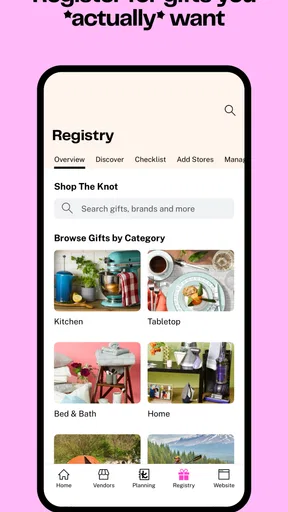
The Knot Wedding Planner provides a comprehensive suite of tools for organizing your wedding. It includes a customizable checklist, a budget tracker, vendor management, and a guest list organizer. Additionally, users can explore inspiration boards and connect directly with vendors. It’s designed to streamline the entire planning process from start to finish.
Is The Knot Wedding Planner free to use?
Yes, The Knot Wedding Planner app is free to download and use. While the core features are accessible without charge, some additional premium content and services might require in-app purchases. This ensures that users have access to a wide range of tools without needing to pay up front.
Can I sync my account across multiple devices?
Absolutely. The Knot Wedding Planner allows you to sync your account seamlessly across multiple devices. This means you can plan your wedding on your phone, tablet, or computer, ensuring that all your data is up-to-date and accessible wherever you are.
How does The Knot Wedding Planner help with vendor selection?
The app offers a robust vendor directory with reviews and ratings from other users. It allows you to search for vendors by location and category, ensuring that you can find the best options for your needs. You can also contact vendors directly through the app, making the process of booking and communication more efficient.
Is The Knot Wedding Planner suitable for all types of weddings?
Yes, The Knot Wedding Planner is versatile and suitable for a wide range of wedding styles and sizes. Whether you're planning a small, intimate gathering or a large, elaborate event, the app provides tools to accommodate various preferences and requirements. It’s designed to cater to diverse cultural and personal wedding traditions.


